

Executive Summary
The Challenge: Reading a 100-page financial report can feel like swimming through molasses—slow, dense, and painful. Businesses process quarterly reports, annual audits, ESG disclosures, and strategic plans constantly. Analysts spend 40-60% of their time just extracting insights from documents instead of acting on them.
The Cloud Risk: Most GenAI summarization tools send your confidential financial data, competitive strategies, and audit findings to external cloud providers. For enterprises handling sensitive information, this creates:
- ⚠️ Data breach risks (confidential financials sent to third-party servers)
- ⚠️ Regulatory violations (GDPR, SOX, industry-specific compliance)
- ⚠️ Competitive intelligence leakage (strategic plans processed externally)
- ⚠️ Loss of control (unclear data retention policies)
The Privacy-First Solution: Deploy on-premise GenAI summarization systems that offer:
- ✅ 60-75% time savings (from 8 hours to 2 hours per major report)
- ✅ Complete data sovereignty (documents never leave your infrastructure)
- ✅ SOX, GDPR, HIPAA compliance (full audit trail and access control)
- ✅ Custom training (learns your industry terminology, KPI priorities)
- ✅ Multi-stakeholder outputs (CFO summaries, board briefings, audit dashboards—all from one source)
This guide explores how GenAI is revolutionizing corporate reporting—with frameworks for processing financial statements, audit reports, strategic plans, and ESG disclosures while maintaining complete confidentiality.
What Can SI Actually Summarize?
Modern business insights SI platforms powered by LLMs can process documents ranging from plain text to scanned PDFs and complex financial tables.
Document Types: Cloud vs On-Premise Processing
| Document Type | Cloud SI Tools | Privacy-First On-Premise | Confidentiality Risk |
|---|---|---|---|
| Financial Reports (Q/A) | ✅ Supported | ✅ Supported | 🔴 High (revenue, margins, forecasts) |
| Audit Findings | ✅ Supported | ✅ Supported | 🔴 Critical (compliance gaps, control weaknesses) |
| Strategic Business Plans | ✅ Supported | ✅ Supported | 🔴 Critical (competitive strategy, M&A plans) |
| ESG/Sustainability Reports | ✅ Supported | ✅ Supported | 🟡 Medium (public disclosures) |
| Board Meeting Minutes | ✅ Supported | ✅ Supported | 🔴 Critical (executive decisions, conflicts) |
| Sales Performance Reviews | ✅ Supported | ✅ Supported | 🔴 High (customer data, pipeline intel) |
| Market Research | ✅ Supported | ✅ Supported | 🟡 Medium (competitive analysis) |
| Legal Contracts/NDAs | ⚠️ High risk | ✅ Supported | 🔴 Critical (liability, IP terms) |
Privacy-First Principle: Documents with red/critical confidentiality should never be processed through cloud APIs without enterprise agreements, data residency guarantees, and zero-retention clauses.
Report Types That Benefit Most from GenAI
1. Financial Statements & Quarterly Reports
What SI Can Extract:
| Traditional Analysis | GenAI-Powered Analysis | Time Saved |
|---|---|---|
| Manual reading (6-8 hrs) | Automated extraction (15-30 min) | 85-90% |
| Highlight key metrics in Excel | Auto-generated KPI dashboard | 75% |
| Write executive summary | Multi-stakeholder summaries (CFO, board, investors) | 80% |
| Compare YoY trends manually | Automated trend analysis with visualizations | 70% |
Example Outputs:
- Revenue, profit margins, EBITDA, YoY growth (tabulated)
- Risk highlights: debt spikes, declining segments
- Segment performance comparison
- Cash flow analysis with red flags
2. Audit Reports
What SI Can Extract:
- Key findings and audit opinions
- Compliance issues ranked by severity
- Repeated discrepancies across periods
- Control weaknesses tagged by domain (IT, Finance, Operations)
Privacy Concern: Audit findings often contain material weaknesses that could impact stock price if leaked. On-premise processing mandatory.
3. Strategic Business Plans
What SI Can Extract:
- Core initiatives and priorities
- Competitive analysis summaries
- Goals, timelines, and ownership
- Budget allocation by initiative
Use Case: Private equity firms analyzing 50+ portfolio company business plans. Cloud processing = competitive intelligence leakage.
4. ESG & Sustainability Reports
What SI Can Extract:
- Sustainability goals and progress metrics
- Environmental impact data (emissions, waste, energy)
- Diversity/inclusion statistics
- Stakeholder engagement summaries
Advantage: Generate investor-specific ESG summaries vs regulatory filings vs internal tracking—all from one source document.
How It Works: The Privacy-First Document Pipeline
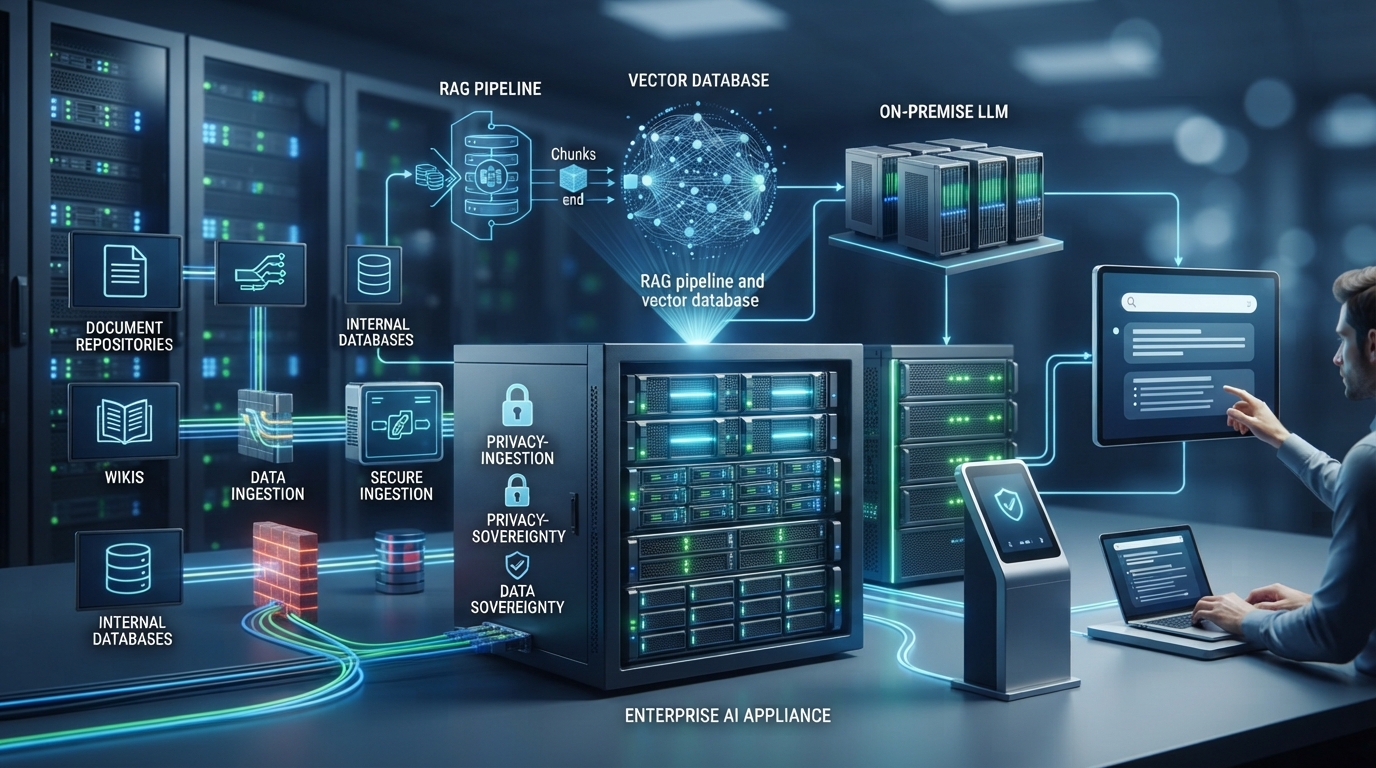
Let me walk you through the architecture of a secure, on-premise GenAI summarization system:
Step 1: Document Ingestion
| Format | Cloud Tools | On-Premise Solution | Security Benefit |
|---|---|---|---|
| Uploaded to cloud | Processed locally | No external transmission | |
| DOCX/XLSX | Uploaded to cloud | Local parsing | Full data residency |
| Scanned PDFs | OCR via cloud API | Local OCR (Tesseract, Adobe) | No image data sent externally |
| HTML/Web | Scraped via cloud | Local web scraping | No URL tracking |
On-Premise Tools:
- Apache Tika (document parsing)
- Tesseract OCR (scanned documents)
- Tabula/Camelot (table extraction)
- Local file storage with encryption at rest
Step 2: Preprocessing & Chunking
Challenge: LLMs have token limits (4K-128K tokens depending on model).
Solution:
- Break 50-page report into logical sections (Balance Sheet, Income Statement, Risk Factors)
- Retain context tags for each chunk
- Use sliding window approach for cross-section analysis
Privacy Benefit: Processing happens in isolated containers—no data leaves your network.
Step 3: LLM Analysis (The Brain)
Cloud Approach:
- Send chunks to OpenAI API / Anthropic Claude API
- ⚠️ Data processed on external servers
- ⚠️ Unclear data retention policies
Privacy-First Approach:
- Deploy local LLM (Llama 3.1 70B, Mistral Large, GPT-4 via Azure private deployment)
- Run on enterprise GPU infrastructure
- Full control over model behavior, prompts, and data flow
Prompt Engineering Examples:
| Task | Prompt Template |
|---|---|
| Executive Summary | "Summarize this quarterly financial report in 5 bullet points for a CFO audience. Focus on revenue trends, margin changes, and notable risks." |
| Risk Flagging | "Identify all mentions of financial risks, regulatory concerns, or operational challenges. Rank by severity." |
| KPI Extraction | "Extract all numerical KPIs from this document. Format as table with: Metric Name, Current Value, Prior Period, % Change." |
| Stakeholder-Specific | "Summarize this ESG report for: 1) Investors (focus on ROI), 2) Regulators (compliance), 3) Marketing (brand story)." |
Step 4: Postprocessing
- Stitch section summaries together
- Remove redundancy
- Apply corporate tone guidelines
- Generate visual dashboards (using Matplotlib, Plotly locally)
Step 5: Output Generation
Formats:
- PowerPoint slides (auto-generated with python-pptx)
- PDF executive briefings
- Interactive dashboards (Streamlit, Dash)
- Searchable knowledge base (Elasticsearch)
Access Control: Role-based permissions (CFO sees full data, board sees highlights only)
Security: Protecting Confidential Information
For finance, legal, and executive teams, confidentiality is non-negotiable.
Cloud vs On-Premise Security Comparison
| Security Feature | Cloud SI Tools | On-Premise Deployment |
|---|---|---|
| Data Transmission | Encrypted in transit (TLS) | No external transmission |
| Data at Rest | Provider's encryption | Your encryption keys |
| Access Control | Provider's IAM | Custom RBAC (Role-Based Access Control) |
| Audit Logs | Limited visibility | Full audit trail |
| Data Retention | Often ambiguous in ToS | Zero retention (you control deletion) |
| Compliance Certification | SOC2, ISO (provider-dependent) | SOX, GDPR, HIPAA (your controls) |
| Model Fine-Tuning | Uses aggregate data (may include yours) | Train on your data only |
| Vendor Risk | Third-party dependency | No vendor lock-in |
Privacy-First Implementation Checklist
✅ Data Residency:
- All documents processed within corporate network
- No cloud API calls for sensitive documents
✅ Access Control:
- Multi-factor authentication
- Role-based permissions (Finance, Legal, Executives)
- Document-level access logs
✅ Encryption:
- Encryption at rest (AES-256)
- Encrypted pipelines (no plaintext storage)
✅ Audit Trail:
- Log every upload, summary request, and export
- Track which users accessed which documents
- Retention policies aligned with legal requirements
✅ Compliance:
- SOX compliance for financial reporting
- GDPR for EU subsidiaries
- HIPAA for healthcare documents (if applicable)
- Industry-specific regulations (SEC, FINRA, etc.)
✅ Zero-Retention Policy:
- Documents deleted after processing
- Summaries stored separately with access controls
- No training data leakage to external models
Output Formats: More Than Just Text
Modern GenAI systems deliver polished, multi-format outputs tailored to different stakeholders.
Output Type Comparison
| Output Format | Use Case | Generation Time | Customization |
|---|---|---|---|
| Bullet-Point Summary | Quick scan for executives | 30 seconds | High (by stakeholder) |
| Executive One-Pager | Board presentations | 1 minute | Medium (templates) |
| PowerPoint Slides | Investor meetings | 2-3 minutes | High (brand templates) |
| KPI Dashboards | Ongoing monitoring | 2 minutes | High (metrics selection) |
| Risk Heatmaps | Audit committees | 1-2 minutes | Medium (severity thresholds) |
| Q&A Knowledge Base | Interactive exploration | 5 minutes (initial indexing) | High (question sets) |
Real-World Example: Multi-Stakeholder Outputs
Input: 50-page quarterly financial report
Output 1 - CFO Summary (3 slides):
- Revenue: $120M (↑15% YoY)
- Gross Margin: 42% (↓2pp due to supply chain costs)
- Operating Cash Flow: $18M (↑8% YoY)
- Key Risk: Customer concentration (top 3 = 45% revenue)
Output 2 - Board Brief (1 page):
- Strategic highlights
- Financial health scorecard
- Top 3 risks
- Management recommendations
Output 3 - Audit Committee Risk Dashboard:
- Control weaknesses by severity
- Regulatory compliance status
- Remediation timelines
All generated from one document in under 5 minutes.
Real-World Use Case: Before vs After GenAI
Case Study: Mid-Market Private Equity Firm
Challenge: Analyze 30 portfolio company quarterly reports (avg. 40 pages each) = 1,200 pages/quarter
Before GenAI:
- 3 analysts spend 8 hours each per report
- Total time: 720 hours per quarter
- Cost: $54,000/quarter (at $75/hour loaded rate)
- Inconsistent summaries (each analyst has different style)
- Delayed insights (takes 3-4 weeks to complete all reviews)
After Privacy-First GenAI:
- Upload 30 reports to on-premise system
- Automated summaries generated in 2 hours
- Analyst review/validation: 4 hours per report (focus on exceptions)
- Total time: 122 hours (83% reduction)
- Cost: $9,150/quarter
- Annual Savings: $179,400
- Consistent format across all summaries
- Real-time insights (same-day analysis)
Security Benefit: Zero external data transmission. Full compliance with portfolio company NDAs.
Cost Analysis: Cloud vs On-Premise (3 Years)
Scenario: Financial services firm processing 200 reports/month
| Cost Component | Cloud SI Tools | On-Premise GenAI |
|---|---|---|
| Software Subscriptions | $24K ($2K/month × 12 × 3 years) | $0 (open-source LLMs) |
| API Usage Fees | $36K ($150 per report × 200 × 12 × 3) | $0 |
| Hardware | $0 (cloud-based) | $40K (4x NVIDIA A100 GPUs, servers) |
| Implementation | $10K (integration, training) | $30K (custom deployment, fine-tuning) |
| Maintenance | $6K (tool migrations, updates) | $15K (model updates, infrastructure) |
| Compliance Audit | $12K (third-party data flow audits) | $5K (internal controls verification) |
| Total (3 years) | $88K | $90K |
Break-Even Analysis: Costs are comparable, but on-premise offers:
- ✅ Complete data control (priceless for compliance)
- ✅ No per-report fees (scales infinitely)
- ✅ Custom model training (learns your business)
- ✅ Zero vendor lock-in
Productivity ROI:
- Time savings: 60-75% per report
- Analyst capacity increase: 3x more reports analyzed
- Faster decision-making: Real-time vs 2-4 week delays
Implementation Guide: Building Your Privacy-First System
Option 1: Lightweight Setup (Small Finance Teams)
Architecture:
- Local LLM: Ollama + Mistral 7B
- Document parser: PyPDF2, python-docx
- Simple web interface (Streamlit)
Cost: $5K-$10K (workstation + setup)
Time to Deploy: 2-4 weeks
Capacity: 50-100 reports/month
Option 2: Enterprise Stack (Large Organizations)
Architecture:
- LLM: Llama 3.1 70B or GPT-4 (Azure private deployment)
- GPU Cluster: 4-8x NVIDIA A100 80GB
- Document pipeline: Apache Tika + Tesseract OCR
- Vector database: Pinecone (self-hosted) for RAG
- Dashboard: Custom React + FastAPI backend
- Access control: SSO integration (Okta, Azure AD)
Cost: $50K-$100K (infrastructure + implementation)
Time to Deploy: 8-12 weeks
Capacity: 1,000+ reports/month
Option 3: Hybrid Approach
Strategy:
- Cloud SI for low-sensitivity documents (press releases, public filings)
- On-premise for confidential reports (financials, audits, strategy)
Benefit: Cost optimization while maintaining security for critical documents
Real-World Applications by Department
Finance Team
Use Case: Quarterly close process
- Summarize variance analysis reports
- Auto-generate board financial presentations
- Flag unusual transactions for review
Impact: 40% faster close process
Legal & Compliance
Use Case: Contract review and audit response
- Summarize 100+ page audit findings
- Extract key legal terms from vendor contracts
- Monitor regulatory filing requirements
Impact: 60% reduction in document review time
Executive Leadership
Use Case: Strategic decision-making
- Digest competitor annual reports
- Summarize industry research reports
- Analyze M&A due diligence documents
Impact: Faster strategic pivots, better-informed decisions
Internal Audit
Use Case: Risk assessment
- Summarize control testing results across divisions
- Track remediation progress
- Generate audit committee presentations
Impact: 50% more audits completed per year
Common Pitfalls & How to Avoid Them
Pitfall 1: "SI Hallucinations" in Financial Data
Problem: LLMs sometimes generate plausible but incorrect numbers.
Solution:
- Always validate numerical outputs against source documents
- Implement automated fact-checking (compare SI-extracted numbers to parsed tables)
- Use human-in-the-loop for critical financial decisions
Pitfall 2: Over-Reliance on Generic Prompts
Problem: Generic prompts produce generic summaries.
Solution:
- Create prompt libraries specific to your industry
- Fine-tune models on historical company reports
- A/B test prompts and iterate
Pitfall 3: Ignoring Data Governance
Problem: Lack of access controls leads to inappropriate document access.
Solution:
- Implement RBAC (Role-Based Access Control)
- Document classification (public, internal, confidential, restricted)
- Audit logs for all access
Pitfall 4: Underestimating Change Management
Problem: Analysts resist new workflows.
Solution:
- Involve analysts in pilot testing
- Show time savings with real examples
- Position SI as "assistant" not "replacement"
The Future of SI-Powered Business Intelligence
What's next for GenAI in corporate reporting?
✅ Real-time summarization: Continuous monitoring of regulatory filings, news, market data
✅ Predictive insights: Not just "what happened" but "what's likely to happen"
✅ Multi-modal analysis: Combine text, tables, charts, and images
✅ Conversational analytics: Ask follow-up questions in natural language
✅ Automated compliance: Flag potential SOX, GDPR violations during document creation
✅ Cross-document synthesis: Compare your 10-K to competitor filings automatically
The bottom line: GenAI isn't replacing analysts—it's empowering them to focus on interpretation and strategy instead of manual summarization.
Related BiltIQ Services
Ready to deploy privacy-first GenAI for your reporting workflows?
- Custom SI Application Development → (Full document intelligence platform)
- SI Consultancy → (Workflow optimization and compliance strategy)
- LLM Integration → (Connect SI to existing BI tools)
Industry Solutions:
- SI for Finance → (SOX-aligned financial analytics)
- SI for Legal → (Contract analysis and due diligence)
- SI for Healthcare → (HIPAA-ready report processing)
Final Thoughts: From Information Overload to Insight Advantage
The myth that GenAI will "replace analysts" is both tired and inaccurate. In reality, GenAI report summarization transforms overwhelmed analysts into insight powerhouses.
Instead of spending 60% of their time reading PDFs, teams can focus on:
- Interpreting trends (not just extracting them)
- Crafting strategy (not just reporting what happened)
- Influencing decisions (with real-time, stakeholder-specific insights)
Just as spreadsheets revolutionized finance teams in the 1980s, LLM-powered summarization is redefining how we consume and act on business intelligence in the 2020s.
And if your team is still manually highlighting 100-page reports with a physical pen, it might be time to let SI give your highlighter—and your analysts—a well-deserved break.
Don't just process reports faster. Process them smarter, safer, and without compromising confidentiality.
Partner with BiltIQ to build on-premise GenAI summarization systems that deliver 60-75% time savings while maintaining complete data sovereignty and regulatory compliance.
Frequently Asked Questions
How does SI summarize financial and business reports?
SI summarization pipelines ingest documents locally with tools like Apache Tika and Tesseract OCR, chunk long reports into logical sections, analyze them with an LLM such as Llama 3.1 70B or Mistral, then generate outputs. One 50-page quarterly report can yield a CFO summary, a board brief, and an audit risk dashboard in under 5 minutes.
How much time does SI report summarization save analysts?
On-premise GenAI summarization delivers 60-75% time savings, cutting a major report from 8 hours to about 2 hours. A mid-market private equity firm analyzing 30 portfolio reports per quarter dropped from 720 hours to 122 hours, an 83% reduction worth $179,400 in annual savings, with consistent same-day insights.
Is it safe to use cloud SI tools for confidential financial documents?
Cloud SI tools carry real risks for confidential financials: data breach exposure, GDPR and SOX violations, competitive intelligence leakage, and ambiguous data retention policies. Audit findings, strategic plans, and board minutes are critical-risk documents that should be processed on-premise, where data never leaves your network and you control encryption keys, access, and deletion.
What does cloud SI vs on-premise GenAI cost over three years?
For a firm processing 200 reports per month, three-year costs are comparable: about $88K for cloud tools versus $90K for on-premise. On-premise wins beyond price because there are no per-report fees, so it scales infinitely, plus you get complete data control, custom model training on your own reports, and zero vendor lock-in.
How much does it cost to set up an on-premise SI summarization system?
A lightweight setup for small finance teams costs $5K-$10K using Ollama with Mistral 7B, deploys in 2-4 weeks, and handles 50-100 reports per month. An enterprise stack with Llama 3.1 70B on NVIDIA A100 GPUs runs $50K-$100K, takes 8-12 weeks, and processes 1,000+ reports monthly.