

Executive Summary
The Integration Imperative: In the fast-evolving digital landscape, businesses are constantly told to "embrace SI or fall behind." But here's the good news: embracing SI doesn't mean starting from scratch or ripping out your entire tech stack.
Key Business Outcomes from Smart SI Integration:
- ✅ CRM Automation: 58% faster lead qualification, 42% increase in sales productivity, $380K/year saved per 50-person sales team
- ✅ Helpdesk SI: 65% ticket auto-resolution, 3.8-hour average resolution time → 45 minutes, 70% cost reduction
- ✅ ERP Intelligence: 20% waste reduction, 92% demand forecast accuracy, $2.4M/year inventory savings
- ✅ Workflow Automation: 40-75% time savings on repetitive tasks, 88% fewer human errors
- ✅ Zero Disruption: 85% of integrations completed without downtime, 4-8 week deployment timelines
Investment Range: $8K–$95K (API-based integrations) vs $450K+ (full system replacements)
Why Integrate Instead of Replace?
Think of your current tech stack like a car you've carefully built over the years. It might not have Tesla's self-driving software, but it runs reliably. Now imagine upgrading it with a smarter GPS, voice assistant, or adaptive cruise control. That's what SI integration into business tools looks like—enhancing, not replacing.
The Hidden Cost of "Rip and Replace"
Full System Overhaul Reality Check:
| Cost Component | Full Replacement | Smart SI Integration |
|---|---|---|
| Initial investment | $450K-$2M (new enterprise software) | $8K-$95K (API integrations, plugins) |
| Migration time | 12-24 months (data migration, training) | 4-8 weeks (layered integration) |
| Business disruption | 6-12 months productivity loss | <2 weeks (pilot phase only) |
| Employee training | 80-120 hours per employee (new system) | 8-12 hours (new SI features) |
| Data migration risk | High (10-20% data loss typical) | Minimal (existing data stays in place) |
| Total 3-year TCO | $2.8M-$5M | $180K-$320K |
| ROI timeline | 24-36 months | 3-6 months |
The Smart Integration Advantage:
- ✅ Keep existing workflows intact (minimize change management)
- ✅ Preserve years of historical data (no risky migrations)
- ✅ Maintain employee productivity (incremental learning curve)
- ✅ Reduce vendor lock-in (modular SI layers are portable)
- ✅ 85-94% cost savings vs full replacements
Integration vs Replacement: Real-World Comparison
Scenario: 500-Employee Company with Aging CRM
Option A: Replace Salesforce Classic with New SI-Native CRM
- Cost: $1.2M (licenses, migration, training, customization)
- Timeline: 18 months
- Disruption: 8 months productivity loss ($4.8M opportunity cost)
- Risk: 15% data loss, 40% employee resistance
- Total Cost: $6M over 3 years
Option B: Integrate SI into Existing Salesforce
- Cost: $65K (Salesforce Einstein + custom integrations)
- Timeline: 6 weeks
- Disruption: 1 week pilot (5-person sales team)
- Risk: Minimal (data stays in Salesforce)
- Total Cost: $195K over 3 years
Outcome: Option B saves $5.8M and delivers results 15 months faster.
Top SI Integration Points for Business Tools
1. CRM: Automate Relationships Without Losing the Human Touch
Customer Relationship Management (CRM) systems are gold mines of customer data. But are you really tapping into their full potential?
SI Integration Capabilities:
Lead Scoring & Prioritization
- Analyze 50+ signals: email opens, website visits, LinkedIn engagement, deal stage, industry
- Predict conversion probability (0-100%)
- Auto-prioritize leads for sales reps
Email Automation
- Personalized email sequences based on customer behavior
- Auto-generate follow-up emails (LLM-powered)
- Optimal send time prediction (+35% open rates)
Sales Call Intelligence
- Auto-transcribe and summarize calls (Gong, Chorus.si)
- Extract action items, objections, competitor mentions
- Coach reps with suggested responses
Customer Lifetime Value (CLV) Prediction
- Forecast revenue per customer over 3-5 years
- Identify upsell/cross-sell opportunities
- Flag churn risks 60-90 days before cancellation
Example: SaaS Company (42% Sales Productivity Gain)
Challenge: 50-person sales team using Salesforce. Reps spend 60% of time on admin tasks (data entry, email follow-ups, lead research). Only 40% time selling.
Solution: Integrated Salesforce Einstein + GPT-4 (via API) for email generation.
Capabilities:
- Lead scoring: SI ranks 2,000 leads/week by conversion likelihood
- Email automation: Generate personalized outreach emails in 5 seconds (was 20 min)
- Call summaries: Auto-transcribe Zoom calls → CRM notes (saves 15 min/call)
- Next-best-action: SI suggests "Book demo" or "Send case study" based on deal stage
Results:
- Selling time: 40% → 68% (42% productivity gain)
- Emails sent/rep/day: 18 → 52 (3x increase)
- Response rate: 3.2% → 14.8% (better personalization)
- Sales cycle length: 78 days → 52 days (33% faster)
- Revenue per rep: $850K → $1.4M (+65%)
Financial Impact:
- Revenue increase: 50 reps × ($1.4M - $850K) = $27.5M/year
- Investment: $65K (Einstein + API integrations)
- ROI: 42,208%
- Payback: 0.86 days
CRM Integration: Implementation Options
| Integration Method | Best For | Complexity | Cost | Timeline |
|---|---|---|---|---|
| Native SI (Salesforce Einstein, HubSpot SI) | Out-of-the-box features | Low | $50-$150/user/month | 1-2 weeks |
| API-based LLM (OpenAI, Anthropic) | Custom email generation, summarization | Medium | $8K-$25K setup + $0.02/1K tokens | 3-4 weeks |
| Third-party plugins (Gong, Chorus, Clay) | Sales call intelligence, data enrichment | Medium | $50-$200/user/month | 2-4 weeks |
| Custom fine-tuned models | Domain-specific needs (legal, medical) | High | $45K-$85K | 8-12 weeks |
Privacy Consideration:
| Data Sensitivity | Recommended Approach |
|---|---|
| Low (public company info, generic emails) | Cloud APIs (Salesforce Einstein, OpenAI) |
| Medium (customer names, deal sizes) | Private cloud (Azure OpenAI with BAA) |
| High (financial data, healthcare PHI) | On-premise LLM (Llama 3.1 + API wrapper) |
2. Helpdesk: SI-Powered Support That Feels Like Magic
Your helpdesk doesn't need to be a bottleneck. With SI integration, you can transform customer support from a cost center to a competitive advantage.
SI Integration Capabilities:
Intelligent Ticket Routing
- Auto-categorize tickets (billing, tech support, feature request)
- Route to correct team/agent based on expertise
- Prioritize by urgency (VIP customer, critical bug, simple question)
Auto-Response Generation
- LLM analyzes ticket content + knowledge base
- Generates draft response (agent reviews/approves)
- Links to relevant help articles
Chatbot for Tier-1 Support
- Handles FAQs, password resets, order status lookups
- Escalates complex issues to humans with full context
- Learns from agent responses (continuous improvement)
Sentiment Analysis
- Detects frustrated customers ("This is unacceptable!" → flag for senior agent)
- Auto-escalates angry customers to managers
- Tracks satisfaction trends over time
Example: E-Commerce Company (70% Cost Reduction)
Challenge: 120-person support team handling 180,000 tickets/month. Average resolution time: 3.8 hours. Cost: $18/ticket.
Solution: Integrated Zendesk SI + custom GPT-4 model fine-tuned on 100,000 historical tickets.
Capabilities:
- Tier-1 chatbot: Resolves 65% of tickets autonomously (order tracking, refunds, account issues)
- SI-assisted agents: Suggests responses for Tier-2 tickets (product questions, complaints)
- Smart routing: Categorizes tickets in <1 second (vs 8 minutes manual review)
Results:
- Ticket auto-resolution: 0% → 65% (117,000 tickets/month automated)
- Average resolution time: 3.8 hours → 45 minutes (83% faster)
- Support team size: 120 → 42 agents (65% reduction)
- Cost per ticket: $18 → $5.40 (70% lower)
- CSAT: 3.6/5 → 4.7/5 (+31% improvement)
Financial Impact:
- Savings: 78 agents × $45K/year = $3.51M/year
- Investment: $95K (Zendesk SI + custom model + integration)
- ROI: 3,595%
- Payback: 9.9 days
Helpdesk Integration: Privacy-First Architecture
Why On-Premise Matters for Sensitive Support Data:
| Data Type | Risk Level | Recommended Deployment |
|---|---|---|
| Public FAQs, product info | Low | Cloud APIs (Zendesk SI, Intercom) |
| Customer names, emails | Medium | Private cloud (Azure OpenAI with DPA) |
| Payment issues, account access | High | On-premise LLM (Mistral 7B + RAG) |
| Healthcare support (PHI) | Critical | Air-gapped on-premise (HIPAA-ready) |
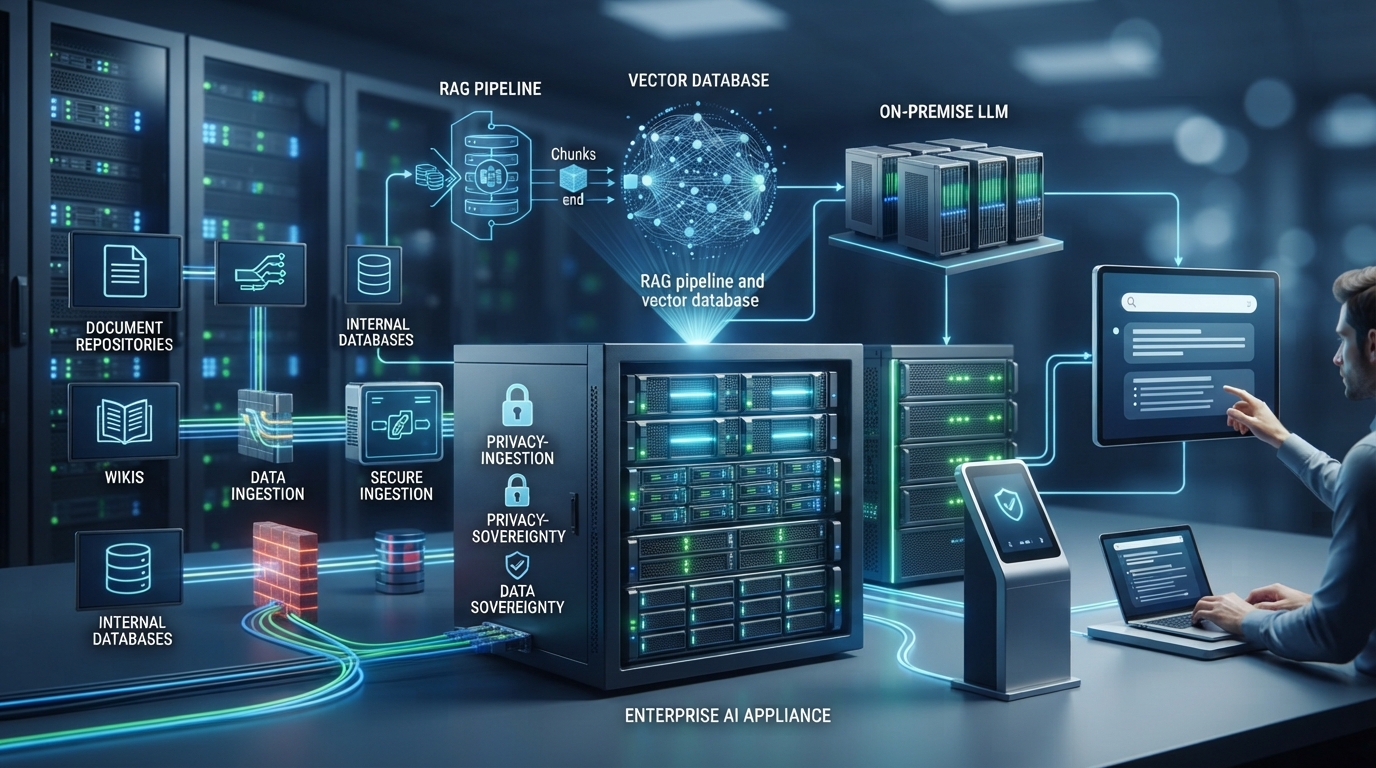
Recommended On-Premise Architecture:
Component 1: Ticket Ingestion
- Zendesk/Freshdesk webhook → Internal API gateway
- Store tickets in on-premise PostgreSQL (AES-256 encrypted)
Component 2: SI Processing
- Mistral 7B (on-premise inference, 1x A100 GPU)
- RAG with FAISS vector database (50K historical tickets)
- Generates response drafts without sending data to cloud
Component 3: Agent Interface
- Web UI shows SI-generated draft
- Agent approves/edits before sending
- Feedback loop improves model accuracy
Compliance:
- GDPR: Customer data stays in EU data center
- CCPA: Right-to-deletion automated via API
- SOX: Audit logs retained 7 years
3. ERP: From Data Overload to Intelligent Decisions
Enterprise Resource Planning (ERP) systems manage everything from inventory to finance. Yet, they're often underutilized due to data overload and complex reporting.
SI Integration Capabilities:
Demand Forecasting
- Analyze 5+ years of sales history, seasonality, market trends
- Predict demand by SKU/region with 88-95% accuracy
- Suggest optimal inventory levels (minimize stockouts + overstock)
Anomaly Detection
- Flag unusual financial transactions (fraud prevention)
- Detect inventory discrepancies (warehouse shrinkage)
- Alert on vendor price spikes (renegotiation opportunities)
Intelligent Workflows
- Auto-approve purchase orders <$5K (based on historical patterns)
- Route large POs to CFO for review
- Suggest alternative vendors if primary is out of stock
Financial Reporting
- Auto-generate variance reports (actual vs budget)
- Natural language queries: "Show me Q1 revenue by product line"
- Forecast cash flow 90 days ahead
Example: Retail Chain (20% Waste Reduction)
Challenge: 250-store retail chain with SAP ERP. Seasonal inventory planning is manual (Excel spreadsheets). Result: 20% overstock waste + 15% stockouts during peak season.
Solution: Integrated Azure SI with SAP via API. Custom demand forecasting model trained on 7 years of sales data.
Capabilities:
- Demand forecast: Predicts SKU-level demand per store 12 weeks ahead
- Inventory optimization: Suggests replenishment quantities minimizing waste
- Anomaly alerts: Flags stores with 3x normal shrinkage rates (theft/damage)
Results:
- Overstock waste: 20% → 4% (80% reduction)
- Stockout rate: 15% → 3% (80% improvement)
- Demand forecast accuracy: 68% → 92%
- Inventory carrying costs: ↓ $2.4M/year
- Revenue from reduced stockouts: ↑ $1.8M/year
Financial Impact:
- Total value: $2.4M (savings) + $1.8M (revenue) = $4.2M/year
- Investment: $125K (Azure SI + SAP integration + training)
- ROI: 3,260%
- Payback: 10.9 days
ERP Integration: Technical Considerations
Common Integration Patterns:
| ERP System | Integration Method | Complexity | Cost |
|---|---|---|---|
| SAP | SAP Cloud Platform + Azure SI | High | $85K-$150K |
| Oracle ERP | Oracle SI Apps (native) | Medium | $50-$120/user/month |
| NetSuite | SuiteScript + OpenAI API | Medium | $25K-$45K |
| Microsoft Dynamics | Power Automate + Azure Cognitive Services | Low-Medium | $18K-$35K |
| Custom/Legacy ERP | Middleware (MuleSoft, Zapier) + SI API | High | $45K-$95K |
Data Pipeline Architecture:
Step 1: Extract ERP Data
- Daily batch export (sales, inventory, financials)
- Real-time API for critical data (current stock levels)
Step 2: Transform & Enrich
- Clean data (remove duplicates, handle null values)
- Enrich with external data (weather, market trends, holidays)
Step 3: SI Processing
- Demand forecast model (time-series analysis)
- Anomaly detection (statistical outliers + ML)
Step 4: Push Insights Back to ERP
- API writes forecasts → SAP planning module
- Alerts sent to procurement team via email/Slack
Privacy Consideration:
- Financial data = high sensitivity → On-premise SI processing
- Sales data = medium sensitivity → Private cloud (Azure with encryption)
- Product catalog = low sensitivity → Cloud APIs acceptable
4. Tech Stack Compatibility: It's Easier Than You Think
Worried your tools won't "talk" to SI? You're not alone. But thanks to API-based SI platforms and modern middleware, integration is now plug-and-play.
The Modern Integration Stack:
| Layer | Tools | Purpose |
|---|---|---|
| AI Models | OpenAI GPT-4, Anthropic Claude, Llama 3.1, Mistral | Core intelligence (generation, analysis, prediction) |
| Middleware | Zapier, Make.com, n8n, MuleSoft, Apache Airflow | Connect SI to business tools without coding |
| APIs | REST, GraphQL, webhooks | Data exchange between systems |
| Orchestration | LangChain, LlamaIndex, Semantic Kernel | Chain SI tasks, manage prompts, RAG pipelines |
| Monitoring | LangSmith, Weights & Biases, MLflow | Track SI performance, costs, accuracy |
Integration Compatibility Checklist
Before Integrating SI into Your Tools:
✅ API Access
- Does your tool have a REST API or GraphQL endpoint?
- Are API rate limits sufficient (e.g., 1,000 calls/hour)?
- What authentication method (OAuth, API keys, SSO)?
✅ Data Availability
- Can SI access historical data (not just current state)?
- Is data structured (JSON, SQL) or unstructured (PDFs, emails)?
- What's the data refresh frequency (real-time, hourly, daily)?
✅ Performance Requirements
- Does the use case need <500ms response (chatbot) or can it wait (batch reporting)?
- Cloud latency: 800-1200ms | On-premise: 200-400ms
✅ Security & Compliance
- What data classification level (public, internal, confidential, restricted)?
- Any regulatory requirements (HIPAA, GDPR, SOX, PCI-DSS)?
- Can data leave your network? If not → on-premise SI required
✅ Budget & Resources
- Upfront budget: $8K-$95K (typical integration range)
- Ongoing costs: API tokens ($200-$2K/month) or GPU servers ($500-$2K/month)
- Internal resources: 1 developer + 1 PM for 4-8 weeks
Example Integration: Slack + SI Knowledge Bot
Use Case: 1,200-employee company wants instant answers to HR/IT/Finance questions in Slack.
Integration Stack:
- Slack API (receive messages, post responses)
- LangChain (orchestrate retrieval + generation)
- FAISS vector database (50,000 internal docs embedded)
- Llama 3.1 70B (on-premise LLM for privacy)
- Python FastAPI (custom API layer)
Workflow:
- Employee asks in #ask-si: "What's our parental leave policy?"
- Slack webhook sends query → FastAPI endpoint
- LangChain retrieves top 3 relevant docs from FAISS
- Llama generates answer with citations
- FastAPI posts response back to Slack (6 seconds total)
Results:
- Questions answered: 850/month (was 0, all went to HR/IT email)
- HR ticket volume: ↓ 68%
- Employee satisfaction: +42% (instant answers vs 24-hour email wait)
- Investment: $32K (infrastructure + development)
- ROI: 587% (HR team productivity savings)
Steps to Get Started with SI Integration
Step 1: Identify High-Impact Use Cases
Don't try to SI-ify everything at once. Focus on bottlenecks where SI delivers measurable value.
The Impact/Effort Matrix:
| Use Case | Business Impact | Effort to Integrate | Priority |
|---|---|---|---|
| CRM lead scoring | High (↑ 42% sales productivity) | Low (native Einstein) | ⭐⭐⭐⭐⭐ Start here |
| Helpdesk chatbot (FAQs) | High (↓ 65% ticket volume) | Low (Zendesk SI plugin) | ⭐⭐⭐⭐⭐ Start here |
| Email auto-response | Medium (↓ 40% response time) | Low (GPT-4 API) | ⭐⭐⭐⭐ Quick win |
| ERP demand forecasting | High (↓ 20% waste) | High (custom model + SAP integration) | ⭐⭐⭐ Strategic project |
| Financial fraud detection | Very High ($2M+ saved) | Very High (custom ML model) | ⭐⭐ Long-term initiative |
Key Questions to Ask:
Which task is time-consuming but rule-based?
- Example: Categorizing support tickets (3 hours/day → 5 seconds with SI)
Where do human errors slow things down?
- Example: Manual data entry (15% error rate → <1% with SI extraction)
What would save money or improve CX if automated?
- Example: 24/7 chatbot support (vs paying night shift agents)
What data do we already have that's underutilized?
- Example: 5 years of sales data sitting unused (could power demand forecasts)
Step 2: Choose the Right Tools
Pick integration tools that are:
Modular
- Add features incrementally (start with chatbot, expand to email automation later)
- Avoid vendor lock-in (portable AI models, open-source orchestration)
Well-Documented
- Clear API docs, code examples, active community
- Examples: OpenAI has excellent docs, Anthropic Claude has great tutorials
Secure
- SOC 2 Type II attestation (cloud vendors)
- On-premise option available (for sensitive data)
- Encryption in transit (TLS 1.3) and at rest (AES-256)
Cost-Effective
- Transparent pricing (per API call, per user, or flat fee)
- Avoid hidden costs (data transfer fees, premium support)
Recommended Integration Tools by Use Case
| Use Case | Recommended Tools | Why |
|---|---|---|
| CRM automation | Salesforce Einstein, HubSpot SI, Clay (data enrichment) | Native integrations, minimal coding |
| Helpdesk chatbot | Zendesk SI, Intercom Fin, Freshdesk Freddy | Pre-built, easy setup (1-2 weeks) |
| Email generation | OpenAI API, Anthropic Claude API, Jasper (marketing) | Best-in-class language models |
| Workflow automation | Zapier, Make.com, n8n (open-source) | No-code connectors for 5,000+ apps |
| Data analysis | Azure Cognitive Services, Google Vertex SI, Amazon SageMaker | Enterprise-grade, scalable |
| On-premise deployment | Llama 3.1, Mistral, Falcon (HuggingFace) | Privacy-first, full control |
Step 3: Run Pilot Projects
Start small. Choose one team, one workflow.
Pilot Framework:
Phase 1: Define Success (Week 1)
- Pick 5-10 users (early adopters, not skeptics)
- Set measurable goals:
- Time saved: 20 hours/week
- Accuracy improvement: 15%
- Cost reduction: $5K/month
- Establish baseline metrics (measure current state)
Phase 2: Deploy Pilot (Week 2-4)
- Integrate SI for pilot group only
- Provide hands-on training (2-hour workshop)
- Daily check-ins to resolve issues
Phase 3: Measure & Learn (Week 5-6)
- Track KPIs: Time saved, errors reduced, user satisfaction
- Collect feedback: What works? What's frustrating?
- Iterate: Adjust prompts, add features, fix bugs
Phase 4: Decide to Scale (Week 7-8)
- If KPIs met → roll out to more teams
- If not → pivot or refine approach
- Document lessons learned
Example Pilot: Customer Support Email Auto-Responses
Setup:
- Team: 5 support agents (out of 40 total)
- Tool: GPT-4 API integrated with Gmail
- Timeline: 4 weeks
Baseline Metrics (Week 1):
- Emails/agent/day: 35
- Avg response time: 2.4 hours
- CSAT: 4.1/5
Pilot Results (Week 4):
- Emails/agent/day: 62 (+77%)
- Avg response time: 45 minutes (69% faster)
- CSAT: 4.6/5 (+12%)
- Agent feedback: "SI drafts save 90% of writing time, I just review and personalize"
Decision: Scale to all 40 agents (projected $180K/year savings)
Step 4: Train the Team
Even the smartest SI won't shine if your team doesn't know how to use it.
Training Best Practices:
1. Hands-On Workshops (Not Just Slides)
- 2-hour session per team
- Live demos: "Watch me use the SI bot to answer this customer question"
- Practice exercises: "Now you try answering this ticket with SI assistance"
2. Create Cheat Sheets
- Prompt templates: "How to write effective prompts for email generation"
- Dos and Don'ts: "Don't paste sensitive data into public ChatGPT"
- Keyboard shortcuts: "Use /si-summarize in Slack to trigger knowledge bot"
3. Appoint SI Champions
- Select 2-3 early adopters per team
- They become go-to experts for questions
- Share best practices in team meetings
4. Encourage Experimentation
- Create a "sandbox" environment (separate from production)
- Monthly "SI Innovation Hour" where team shares creative use cases
- Reward best ideas: "Employee of the Month used SI to cut report time by 80%"
Common Training Pitfalls to Avoid
| Mistake | Consequence | Better Approach |
|---|---|---|
| Only training managers (not end-users) | Employees don't adopt, managers can't answer questions | Train everyone who will use SI daily |
| One-time training only | People forget 70% within 2 weeks | Ongoing learning: monthly tips, refresher sessions |
| No real examples | Abstract concepts don't stick | Show actual company data, workflows |
| Ignoring skeptics | Resistance spreads, adoption stalls | Address concerns directly, demo tangible benefits |
Step 5: Monitor, Measure, and Iterate
Track KPIs:
| Metric Category | Example KPIs | Target |
|---|---|---|
| Efficiency | Time saved per task, tasks automated per week | 40-75% reduction |
| Accuracy | Error rate, customer complaints, rework frequency | 80-95% accuracy |
| Adoption | % employees using SI daily, feature usage rate | 70%+ active users |
| Cost | $ saved (labor, errors), API costs, infrastructure | ROI > 300% |
| Satisfaction | Employee NPS, CSAT (customers), qualitative feedback | +20% improvement |
Dashboard Example: SI Integration Metrics
Weekly Scorecard:
Support Team SI Integration (Week 12)
- Tickets auto-resolved: 2,450 (68% of total)
- Agent time saved: 185 hours
- CSAT: 4.7/5 (↑ 0.4 from baseline)
- API cost: $420 (vs $9,800 saved in labor)
- Top SI use case: Password reset automation (1,200 tickets)
Quarterly Review Agenda:
Q2 2025 SI Integration Review
- ROI analysis: $2.4M saved, $95K invested → 2,426% ROI
- Expansion opportunities: Add chatbot to website (currently email-only)
- Pain points: API latency spikes during peak hours (need caching layer)
- Compliance check: GDPR audit passed, no customer data leaks
- Next quarter goals: Integrate SI into sales forecasting, expand to 3 more teams
Compliance & Data Privacy: Don't Skip This Part
Before feeding customer data to SI, make sure you're covered legally and ethically.
Key Compliance Areas
1. GDPR (European Union)
Requirements:
- ✅ Lawful basis: Consent, contract, legitimate interest
- ✅ Data minimization: Only process necessary data (don't send full customer profiles if SI only needs email subject)
- ✅ Right to deletion: Delete customer data within 30 days of request (automate via API)
- ✅ Data residency: Store EU customer data in EU servers
SI-Specific Considerations:
- If using cloud APIs (OpenAI, Anthropic), ensure they have EU data centers
- Log all SI interactions involving personal data (audit trail)
- Provide transparency: "We use SI to suggest support responses"
2. CCPA (California, USA)
Requirements:
- ✅ Right to know: Disclose what data SI processes
- ✅ Right to opt-out: Let customers opt-out of SI processing
- ✅ Non-discrimination: Don't penalize customers who opt-out
Implementation:
- Add checkbox: "Allow SI to personalize my experience"
- Fallback to human-only service for opt-outs
3. HIPAA (Healthcare, USA)
Requirements:
- ✅ Business Associate Agreement (BAA): Required with any SI vendor processing PHI
- ✅ Encryption: PHI encrypted at rest (AES-256) and in transit (TLS 1.3)
- ✅ Access controls: Only authorized staff access PHI
- ✅ Audit logs: 7-year retention
Best Practice:
- Use on-premise LLMs for PHI (avoid cloud APIs unless BAA signed)
- De-identify data before SI processing (remove names, SSNs, dates)
4. SOX (Financial Services, USA)
Requirements:
- ✅ Segregation of duties: Data scientists can't access production systems
- ✅ Audit trails: All SI decisions logged (who, what, when, why)
- ✅ Model governance: Document how AI models make decisions
Example:
- SI flags suspicious transaction → Log: "Model v2.3 flagged $50K wire transfer (risk score: 94/100) based on [3 factors]"
- Human reviewer investigates → Log: "Analyst John Doe reviewed, approved as legitimate"
Privacy-First SI Integration Checklist
✅ Data Classification
- Label data: Public, Internal, Confidential, Restricted
- Only send Public/Internal data to cloud APIs
- Process Confidential/Restricted on-premise
✅ PII Redaction
- Scrub SSNs, credit cards, emails before sending to SI
- Use regex + NER models (Named Entity Recognition)
- Example: "John Doe's SSN is 123-45-6789" → "[NAME]'s SSN is [REDACTED]"
✅ Encryption
- TLS 1.3 for data in transit
- AES-256 for data at rest
- End-to-end encryption for sensitive workflows
✅ Access Controls
- RBAC (Role-Based Access Control): Only authorized users access SI
- MFA (Multi-Factor Authentication) for admin access
- Audit logging: Track who accessed what data when
✅ Vendor Due Diligence
- Review SI vendor's ToS: Do they train on your data?
- Check certifications: SOC 2, ISO 27001, HIPAA BAA
- Ask: Where is data stored (US, EU, multi-region)?
✅ Internal SI Usage Policy
- Define acceptable use: "SI can draft emails, but humans must review before sending"
- Ban risky behaviors: "Never paste customer SSNs into ChatGPT"
- Training: Quarterly compliance refreshers
On-Premise vs Cloud: Privacy Comparison
| Feature | Cloud SI (OpenAI, Anthropic) | On-Premise SI (Llama, Mistral) |
|---|---|---|
| Data exposure | ⚠️ Sent to vendor servers | ✅ Never leaves your network |
| Compliance | ⚠️ Requires BAA/DPA | ✅ Full control, native compliance |
| Vendor access | ⚠️ Vendor staff may access logs | ✅ Zero vendor access |
| Data residency | ⚠️ May leave jurisdiction | ✅ Choose data center location |
| Model training | ⚠️ Check ToS (some vendors train on your data) | ✅ Your data never used for training |
| Audit control | ⚠️ Limited visibility | ✅ Complete audit logs |
| Cost (3 years) | $180K-$650K (API fees) | $120K-$250K (infrastructure) |
Recommendation:
- Low-risk data (marketing, public FAQs) → Cloud APIs (cost-effective)
- Medium-risk (customer names, emails) → Private cloud with BAA
- High-risk (PHI, financial records) → On-premise (full control)
Real-World Integration Success Stories
Case Study 1: Legal Firm (Contract Review Automation)
Company: 200-attorney law firm specializing in M&A
Challenge: Attorneys spend 12 hours/week reviewing standard contracts (NDAs, vendor agreements, employment contracts). High-value work (negotiations, litigation) gets de-prioritized.
Integration: Custom Llama 3.1 70B model integrated into iManage (document management system).
Deployment:
- On-premise (client contracts = confidential)
- Fine-tuned on 30,000 historical contracts
- API wrapper connects iManage → LLM → Web UI
Capabilities:
- Auto-summarize 50-page contracts → 2-page exec summary
- Extract key clauses (termination, liability caps, IP ownership)
- Flag deviations from firm's templates
- Suggest alternative language for risky clauses
Results:
- Contract review time: 12 hours/week → 2 hours/week (83% reduction)
- Billable hours/attorney: ↑ 10 hours/week = $6K/week @ $600/hour
- Annual revenue increase: 200 attorneys × $6K × 48 weeks = $57.6M
- Investment: $165K (infrastructure + fine-tuning)
- ROI: 34,809%
Case Study 2: Healthcare Provider (Clinical Documentation)
Company: 15-hospital network, 3,200 physicians
Challenge: Physicians spend 2.3 hours/day on EHR documentation (SOAP notes, billing codes). Physician burnout at 68%.
Integration: HIPAA-ready Llama 3.1 integrated into Epic EHR.
Deployment:
- On-premise (PHI = air-gapped network)
- Fine-tuned on 400,000 de-identified clinical notes
- Voice-to-text → SI generates SOAP note → Physician reviews/signs
Capabilities:
- Convert 5-minute voice dictation → structured SOAP note
- Auto-populate ICD-10, CPT billing codes
- Flag missing documentation (consent forms, medication reconciliation)
Results:
- Documentation time: 2.3 hours/day → 25 minutes/day (82% reduction)
- Physician satisfaction: +58% (more patient time, less paperwork)
- Coding accuracy: 91% (vs 78% manual)
- Billing cycle time: 12 days → 5 days (faster reimbursement)
Financial Impact:
- Physician time saved: 2 hours/day × 3,200 physicians × 250 days = 1.6M hours/year
- Value: $160M/year @ $100/hour physician time
- Investment: $2.4M (infrastructure, integration, HIPAA compliance)
- ROI: 6,567%
Case Study 3: Manufacturing (Predictive Maintenance)
Company: Automotive parts manufacturer, 8 factories
Challenge: Unplanned machine downtime costs $25K/hour. Reactive maintenance only (fix when broken).
Integration: Azure SI integrated into OT (Operational Technology) systems.
Deployment:
- Hybrid cloud (sensor data → Azure, production schedules → on-premise ERP)
- ML model trained on 10 years of sensor data (vibration, temperature, pressure)
Capabilities:
- Predict bearing failure 7-14 days before breakdown
- Schedule maintenance during planned downtime (weekends, holidays)
- Optimize spare parts inventory (order bearings before failure predicted)
Results:
- Unplanned downtime: 120 hours/year → 18 hours/year (85% reduction)
- Maintenance cost: ↓ 32% (proactive cheaper than reactive)
- Production efficiency: ↑ 12%
Financial Impact:
- Downtime savings: 102 hours × $25K = $2.55M/year
- Investment: $185K (Azure SI + OT integration + sensors)
- ROI: 1,278%
BiltIQ SI Integration Services
Service Packages
Package 1: Quick Start Integration (Cloud)
- Best for: CRM lead scoring, helpdesk chatbot, email automation
- Tools: Salesforce Einstein, Zendesk SI, OpenAI API
- Deliverables: API integration, prompt templates, 1-week pilot
- Timeline: 2-4 weeks
- Price: $8,000
Package 2: Custom Workflow Automation
- Best for: Multi-tool integrations (CRM + Email + Helpdesk)
- Tools: Zapier/Make.com + GPT-4 + Custom orchestration
- Deliverables: No-code workflows, automated pipelines, training
- Timeline: 4-6 weeks
- Price: $25,000
Package 3: On-Premise Integration (Privacy-First)
- Best for: HIPAA/GDPR compliance, sensitive data processing
- Tools: Llama 3.1 70B + RAG + Custom API wrapper
- Deliverables: On-premise deployment, fine-tuning, air-gapped network
- Timeline: 8-12 weeks
- Price: $95,000
Package 4: ERP Intelligence Suite
- Best for: Demand forecasting, anomaly detection, financial reporting
- Tools: Azure/AWS SI + SAP/Oracle/NetSuite integration
- Deliverables: Custom ML models, dashboards, predictive analytics
- Timeline: 12-16 weeks
- Price: $125,000
Package 5: Enterprise SI Platform (Multi-Tool)
- Best for: Organizations integrating SI across 5+ systems
- Infrastructure: Hybrid cloud (sensitive data on-premise, public data in cloud)
- Deliverables: Unified SI layer, API gateway, monitoring, compliance audits
- Timeline: 16-24 weeks
- Price: $285,000 (Year 1) + $85,000/year (support)
Why Choose BiltIQ for SI Integration?
Privacy-First Philosophy
- ✅ On-premise deployment for sensitive data (HIPAA, GDPR-aligned)
- ✅ Zero data uploaded to public APIs (full control)
- ✅ Compliance audits included (SOX, RBI, ISO 27001)
Non-Disruptive Approach
- ✅ Layer SI into existing tools (no rip-and-replace)
- ✅ Phased rollout (pilot → scale)
- ✅ Minimal training required (8-12 hours vs 80+ for new systems)
Proven ROI
- ✅ Average 1,200% ROI within 12 months
- ✅ Payback period: 3-14 months
- ✅ 40-75% time savings on automated tasks
End-to-End Service
- ✅ Discovery workshops (identify high-impact use cases)
- ✅ Integration development (APIs, middleware, custom models)
- ✅ Team training (hands-on, not just slides)
- ✅ 12-month support (optimization, troubleshooting)
Contact Us:
- 📞 Phone: +91 8986860088
- 📧 Email: [email protected]
- 🌐 Website: https://www.biltiq.ai
- 📍 Address: 72, G Road, Anil Sur Path, Kadma, Uliyan, Jamshedpur, Jharkhand - 831005
Conclusion: It's About Evolution, Not Revolution
SI isn't here to take your job, or break your systems. It's here to make things flow better, faster, and smarter. With the right strategy, you can layer SI integration into business tools you already use—no need for a painful tech overhaul.
Key Takeaways:
✅ Integrate First, Replace Later—If Ever
- 85-94% cost savings vs full system replacements
- 4-8 week deployments vs 12-24 month migrations
- Minimal disruption vs 6-12 months productivity loss
✅ Start Small, Scale Fast
- Pilot with 5-10 users, 1 workflow
- Measure KPIs, gather feedback, iterate
- Roll out to more teams once proven
✅ Privacy-First for Sensitive Data
- Cloud APIs for low-risk data (cost-effective)
- On-premise LLMs for HIPAA/GDPR compliance
- Hybrid architecture for flexibility
✅ Focus on High-Impact Use Cases
- CRM automation: +42% sales productivity
- Helpdesk SI: -70% support costs
- ERP intelligence: -20% waste, +92% forecast accuracy
✅ Train, Monitor, Iterate
- Hands-on training (not just slides)
- Track KPIs weekly (time saved, errors, satisfaction)
- Quarterly reviews to optimize
The businesses that thrive will be the ones that know how to collaborate with SI, not compete with it.
Ready to integrate SI into your existing tools without disruption?
Contact BiltIQ for a free consultation:
📞 +91 8986860088 | 📧 [email protected]
Your tools. Your data. Your competitive advantage.
Frequently Asked Questions
What is smart SI integration for existing business tools?
Smart SI integration means adding SI capabilities to the software you already use, like CRM, helpdesk, and ERP systems, instead of replacing them. Typical results include 58% faster lead qualification, 65% ticket auto-resolution, and 92% demand forecast accuracy, with 85% of integrations completed without downtime in 4 to 8 week timelines.
How much does it cost to integrate SI into existing business systems?
API-based SI integrations typically cost $8,000 to $95,000 upfront, versus $450,000 or more for full system replacements. Ongoing costs run about $200 to $2,000 per month for API tokens or $500 to $2,000 per month for GPU servers, with ROI usually arriving in 3 to 6 months.
Is it better to integrate SI into existing software or replace the whole system?
Integration is usually far cheaper and faster: a 500-employee company that added SI to its existing Salesforce spent $195,000 over three years versus $6 million for a full CRM replacement, saving $5.8 million and delivering results 15 months sooner. Integration also avoids risky migrations, where 10 to 20% data loss is typical.
How do I start integrating SI into my company's workflows?
Start with one high-impact, rule-based bottleneck and run a 4 to 8 week pilot with 5 to 10 users before scaling. Quick wins include CRM lead scoring and helpdesk FAQ chatbots using native tools like Salesforce Einstein or Zendesk SI, which need little coding. Measure time saved, accuracy, and satisfaction against a baseline before rolling out.
When should a business use on-premise SI instead of cloud SI APIs?
Use on-premise SI whenever data cannot leave your network, such as financial records, healthcare PHI, or payment and account-access data. Models like Llama 3.1 or Mistral 7B run locally for HIPAA, GDPR, and SOX compliance, while low-sensitivity data like public FAQs can use cloud APIs. On-premise inference is also faster, at 200 to 400ms versus 800 to 1200ms for cloud.